// this code is for convert long to bytes. // long2Bytes(0x12345670, 1) => 0x1 // long2Bytes(0x12345670, 2) => 0x12 publicstaticfinalbyte[] long2Bytes(long l, int len) { if (len < 0) { returnnull; } else { if (len > 8) { len = 8; }
byte[] temp = newbyte[len]; inti= len - 1;
for(intj=0; i >= 0; ++j) { temp[j] = (byte)((int)(l >>> (i << 3))); --i; }
Posted onWord count in article: 308Reading time ≈1 mins.
Today I have found the uv increased in Feb. 18 ~ 22. I was so excited. So I use analystic to find why the user visitors are so many in these days. Suddenly, I found the visitor are from ‘Refered news.grets.store’ and ‘Refered static.seders.website’. Then I search the two website in google. Emm, these of two are spam!! Emm, I finally realized my websit can not be so popular.
error: 1783 bytes of body are still expectediB | 193.00 KiB/s fetch-pack: unexpected disconnect while reading sideband packet fatal: early EOF fatal: fetch-pack: invalid index-pack output
尝试多次,仍然是这个问题,感觉这个和网速也没有太大的问题。继续查资料。修改git配置
1
git config --global core.compression 0
报错为:
1 2 3
Cloning into 'sd-dynamic-prompts'... error: RPC failed; curl 16 Error in the HTTP2 framing layer fatal: expected flush after ref listing
privatestaticfinalCounterrequestsTotal= Counter.build() .name("myapp_requests_total") .help("Total number of requests.") .labelNames("name") .register();
privatestaticfinalCounterrequestsTotal= Counter.build() .name("myapp_requests_total") .help("Total number of requests.") .labelNames("path", "clientType") .register();
var userId = 'your name'; var password = 'your password'; var userInput = document.querySelector('input[name^=user]'); var passwordInput= document.querySelector('input[name^=password]'); var loginButton = document.querySelector('.css-3coq9d-button');
Posted onWord count in article: 5.5kReading time ≈5 mins.
I update Hexo last stable version (6.3.0). And I change node/npm version to v18.18.0/9.8.1.
I found the changes in Hexo is quite big. I found images can not be displayed properly.
Then it worked. I think it is hexo incompatibility issue.
Every time I add a centered picture and picture title, I write like the above code. It’s too complicated. If hexo support markdown template,m, I will write like this:
returnfunctionassetImgMidTag(args) { const len = args.length; if (args.length <= 0) { console.warn('image path is not set. args:', args, 'file:', this.full_source); return; }
var path = args[0]; var figure = ''; var text = ''; if (args.length >= 2) { figure = escapeHTML(args[1]); }
if (args.length === 3) { text = escapeHTML(args[2]); } // Find image html tag var image = getImage(this._id, path, text, ctx); return`<div align=center><br/>${image}<br/><strong>${figure}</strong><br/></div>` }; };
In file node_modules/hexo/lib/plugins/tag/index.js, add the following code.
If you install jsdelivr_cdn plugin. And you write your _config.yml in Hexo root like this:
1 2 3
jsdelivr_cdn: use_cdn:true cdn_url_prefix:writeyour_cdn_root_pathlike'https://cdn.jsdelivr.net/gh/<username for github>/<assets repo name>/'
The html will be generated like this:
1 2
<divalign="center"><br><imgsrc="https://cdn.jsdelivr.net/gh/<username for github>/<assets repo name>@master/image/a.png"class=""><br><strong></strong><br></div>
The effect is as follows:
在4旁边生成4
The image tag is generated as CDN path.
This image_mid is support:
post asset path
relative path
http/https path
And post asset path and relative path can be generated as CDN path.
Posted onEdited onWord count in article: 3.3kReading time ≈3 mins.
Before
Thanks for inviting me to answer the question: “Design a HashMap”. The description of the question is here:
1 2
Design methods like *put, get, containsKey, containsValue, remove* etc and answer the *complexity*.
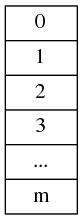
All of us knows “HashMap”. It is not “HashTable” see Figure 1.1. It means there does not exist a big array to store all of data.
Figure 1.1 hashtable
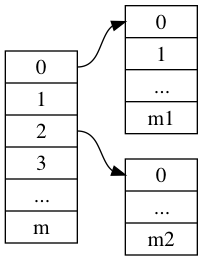
Compute hash(key) and put the value into array[hash(key)]. If array[hash(key)] is stored by other data, you must not put it into another slot. See Figure 1.2. You should create space for storing your new data.
Figure 1.2 hashmap
Complexity
How to design it? We should have a hash function. And create an array/list called slot/bucket to store pointers/references which point to real data. Simple? But we should not implement the code immediately. Consider the functions and complexity first.
I assume complexity of hash function is O(hash). And the complexity of Operator is T(n). It means doing the operator n times. We look at put function. O(hash) often is done in constant time as O(1). But in special case like hash(Big Integer or Long String), the complexity of hash function will be O(x), x is related with the length of Big Integer or Long String. Em…Those are extreme cases, and we don’t care! So we just consider O(hash) as O(1).
1 2 3 4 5 6
put(key,value)
T(n) = O(hash) + O(create one space) + O(insert into new space) + T(n-1) O(create one space) is O(1) so T(n) = O(1) + O(insert into new space) + T(n-1)
So what’s the O(insert into new space) ? I don’t know. If it is a single linklist, it will be O(1). We can insert the data into the head of linklist. But if we use other data structures? I will not discuss here. I should list other operaters first.
We assume our hash function is extreme good. The function will decentralize keys homogeneously. According to pigeon hole principle, the length of every space is no more than (N/m + 1). N is the total number of your data. m is the number of slots.
1 2 3 4 5 6 7 8 9 10 11 12 13 14
get(key)
T(n) = O(hash) + O(look up key from space) + O(return value) + T(n-1) If key is bind with value, so you find the key, and you also find the value. So complexity is no more than T(n) <= O(hash) + O(N/m + 1) +O(1) + T(n-1)
if m >> n (m is much bigger than n), then T(n) <= O(1)+O(1) + T(n-1) = O(1) + T(n-1)
if n >> m, then T(n) <= O(1) + O(N) + T(n-1) = O(N) + T(n-1)
and containsKey
1 2
containsKey(key) T(n) = O(hash) + O(look up key from space) + T(n-1)
Emm…The complexity of containsKey is similar with that of get(key). contain(key) is equal with get(key) ? Maybe.
and next is containsValue
1 2 3
containsValue(value)
T(n) = O(find value in all space) + T(n-1)
In the simple hashmap, there dose not exist value -> key mappings. so the complexity is O(n). We should iterator all values to find the target one.
And next is remove
1
2
3
4
remove(key)
T(n) = O(hash) + O(look up key from space) + O(remove key-value) + T(n-1)
If in put(key,value), we use single linklist and insert key-value into head every time. We find the key-value is O(N/m +1) and remove it is O(1). So
1
2
3
remove(key)

T(n) = O(N/m + 1) + T(n-1)
Optimize?
Can we use other data structures to optimize some operation? Yes. But we should consider other factors. like More complex, more bugs. and Effect of optimizing operation. For example, we consider the operation containsValue(value) is bad performance O(n). We can use another kind of hashmap structure to store value -> key mapping. So if we call containsValue(value), we will first call getKey(value) to get key, and then call get(key) to find the value. It sounds good! But how often we will call containsValue(value)? Maybe in every 1000 operations, only 1 operation is containsValue(value) and 999 are containsKey/put/get/remove. There is a little better effect vs more complex code. Which do you choose? And if you don’t optimize containsValue, will user think your application is too slow to use?